|
Weblog: Recent Changes


in Koha Croatian user group
|
|
Format brojaOdabran je 10-tero znamenkasti broj (3+7 znamenki) III1234567
7 zmaneki omogućava omogućava 9,999,999 primjeraka po ustanovi, a troznamenkasni prefix je odabran jer Crolist već koristi dvije znamenke za ustanovu i 7 za primjerak (ukupno 9 znamenki), pa je moguće razlikovati barcode iz Crolista od barcoda iz Kohe prema broju znamenki Barcode standardiNadopisati lijepi opis, a do tada, Barcode journy opisuje Dobricine eksperimente sa barcode softverom. Iskustva sa opermom
Gdje se koriste plugini?Koha plugin je funkcionalnost skrivena iza lika ... (tri točkice) u poljima za editiranje:  Plugin je u osnovi pop-up prozor koji se otvara klikom na link i koji može vratiti podatke u polje iz kojeg je otvoren. DijeloviSastoji se od dvije datoteke:
Instalacijahttps://10.60.0.252:8443/cgi-bin/koha/admin/marc_subfields_structure.pl 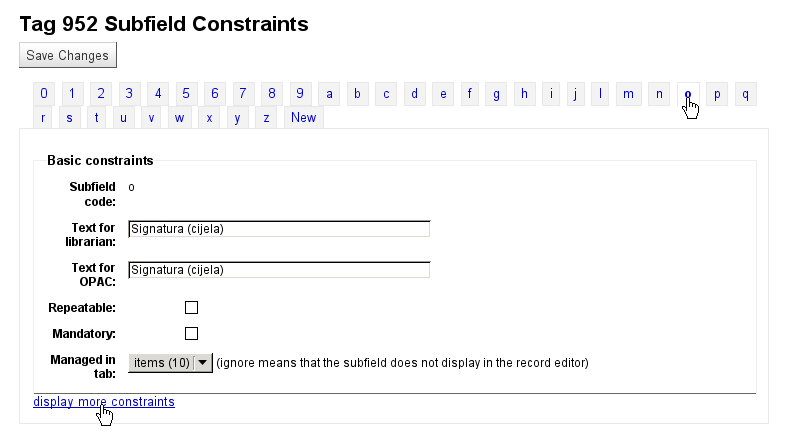 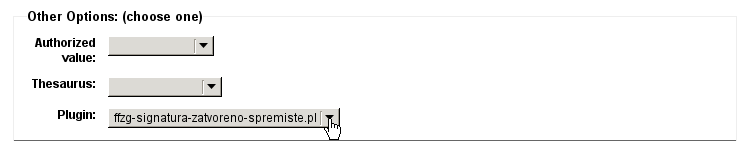 EditiranjeAko se plugin editira u koha checkout direktoriju /srv/koha treba ga prvo instalirati na sistem:
cp -v ./koha-tmpl/intranet-tmpl/prog/en/modules/cataloguing/value_builder/ffzg-signatura-zatvoreno-spremiste.tmpl \
       /usr/share/koha/intranet/htdocs/intranet-tmpl/prog/en/modules/cataloguing/value_builder/

cp -v ./cataloguing/value_builder/ffzg-signatura-zatvoreno-spremiste.pl \
       /usr/share/koha/intranet/cgi-bin/cataloguing/value_builder/
Up: Workspace Tour - Table of Contents Share information about projects and tasks with your team.
... you can use pages in a Workspace to build collections of pages...
Up: Workspace Tour - Table of Contents Here's an example of what a conversation page might look like...
Follow us to see how you can use workspace pages for meeting agendas... This is the people directory, a list of people working in this workspace. It is built by you, as a place to introduce yourself. Please add yourself below and then create your own homepage. Find out more: Introduce yourself.
Meet your fellow socialtext users. You're not alone! Meet other Socialtext customers and support representatives on the . If you have a question, this is the place to go.
Up: Workspace Tour - Table of Contents You're now ready to use your workspace! Now, think about how you want to use it for you and your workgroup, and start creating and editing pages. To start, you might want to create a personal page for yourself. Just visit the dashboard and click the New Page button. Or, you can start with any other page you'd like. For more ideas, check out the collection of Best Practices over at the Socialtext Customer Exchange. Enjoy! The Socialtext Crew
Up: Workspace Tour - Table of Contents
Let's look at some more advanced getting around
Up: Workspace Tour - Table of Contents Here are links to some of the pages in this workspace.
Now that I know about some of the things I can use a Workspace for, how do I find my way around?
Up: Workspace Tour - Table of Contents Here are some more advanced workspace navigation techniques. If you like, you can go back to the basic page, called How do I find my way around? You can use tags to group pages that are related. Anyone can put a tag on a page by clicking the Add tag button in the sidebar. You can find pages with a given tag by clicking the tag if it appears in the sidebar, or by going to the dashboard, then clicking on the "All tags" link. Next: Can I change something? |
Weblog Archives
|



